Flighty: The Flight Tracking App I Will Not Fly Without
If you ask me to name a single must have app for flying, I will not point you to an airline app.
I will point you to Flighty.
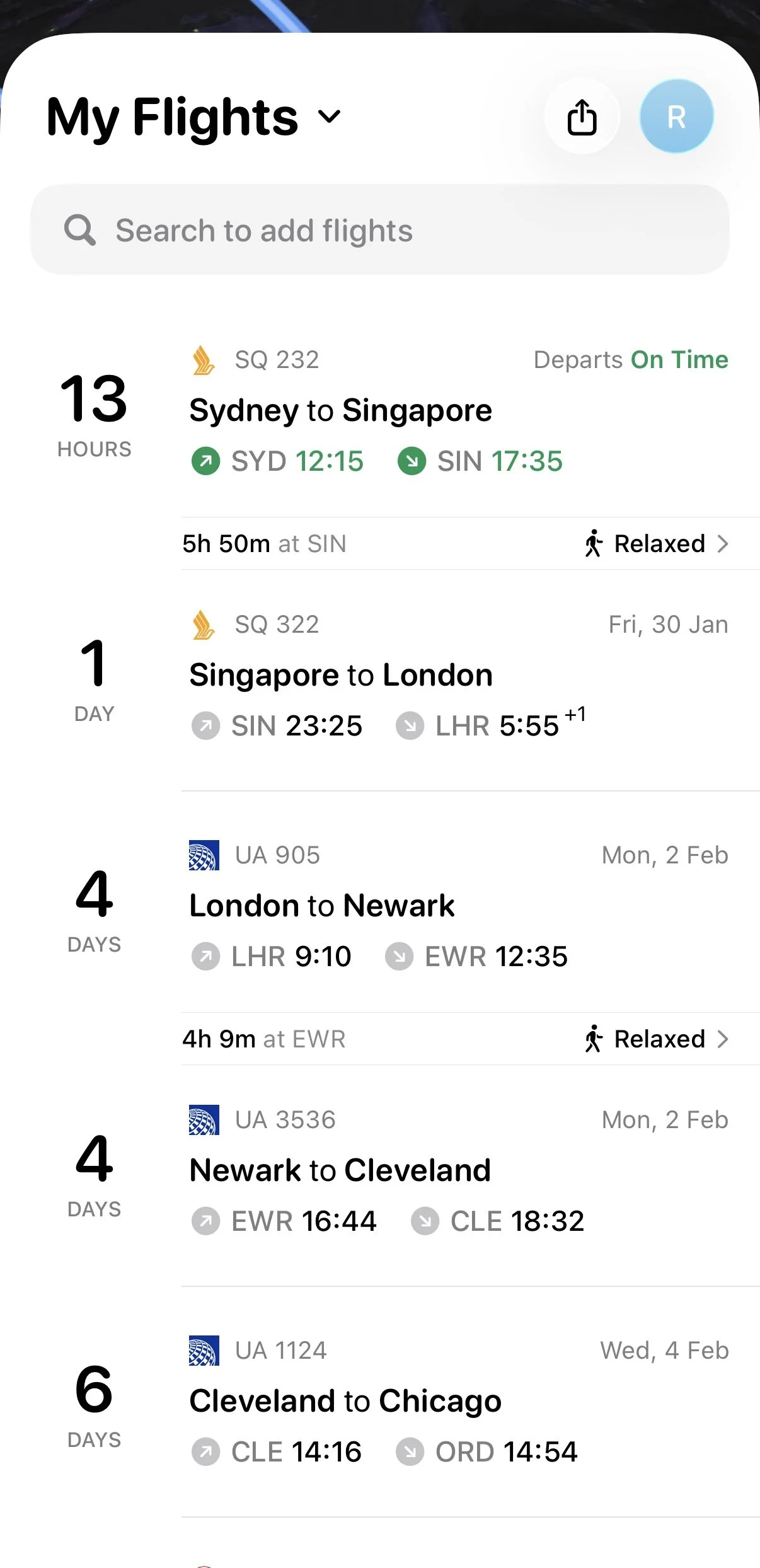
Flighty app main screen, showing upcoming flights that you have registered
It is the app I genuinely depend on every time I fly, and if you spend any amount of time in the air, whether it is a short Low Cost Carrier (LCC) hop or a long haul flight, it can change how a travel day feels.
For transparency, I pay for Flighty Pro, so some of what I describe here lives on the paid plan rather than the free version. The free version already gives you a solid taste of what Flighty can do, and in my experience the paid version has been well worth the money.
At its core, Flighty does two simple things. It tracks your flights on a day to day basis so you always know what is next, and it keeps an ongoing record of your flights worldwide. Over time that turns into a surprisingly satisfying way to look back at where you have been.
By the way, I am not sponsored or endorsed by Flighty in any way. I simply use it a lot, love it, and have been saved by it many times, so I want to share it with fellow travelers and flyers.
What Flighty Actually Does
Flighty is a flight tracking app that focuses only on one thing: your flights.
You add your flight number or search by route with travel dates, or let it sync from your calendar. Flighty then builds a clean timeline for your trips so you always have a single place to check what is coming up next. This is especially helpful if you have multiple bookings across different airlines.
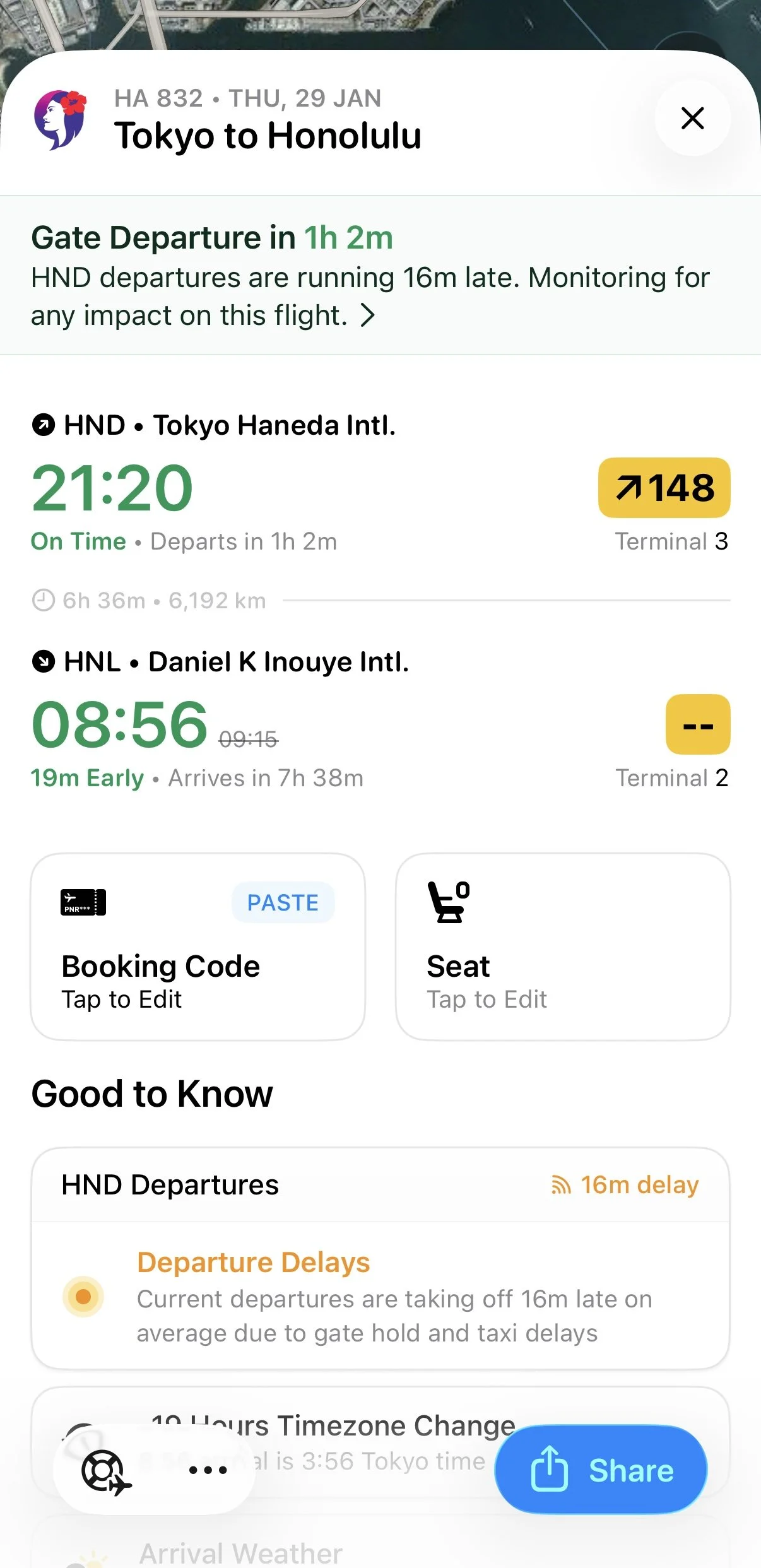
Flighty app screen showing an upcoming flight
At the most basic level, Flighty keeps all the essentials in one screen:
Your upcoming flights listed in order
Departure and arrival airports, dates, and local times
Terminals and gates once they are available
Current status such as scheduled, boarding, in flight, or landed
You could fairly ask at this point why you should bother with Flighty when airline apps already exist.
Even on those basics I find that Flighty already does a better job than most airline apps. The information is presented more clearly, it updates more reliably, and you do not have to install every airline app on your phone just to know what is next.
Where it really shines is everything it does on top of that. Flighty actively watches for anything that might affect your flights and alerts you when something changes:
Schedule changes
Delays and cancellations
Gate information and gate changes
The exact aircraft you are flying on, where and when that aircraft is flying in from, and any aircraft swaps
The performance history of that route and typical delay patterns
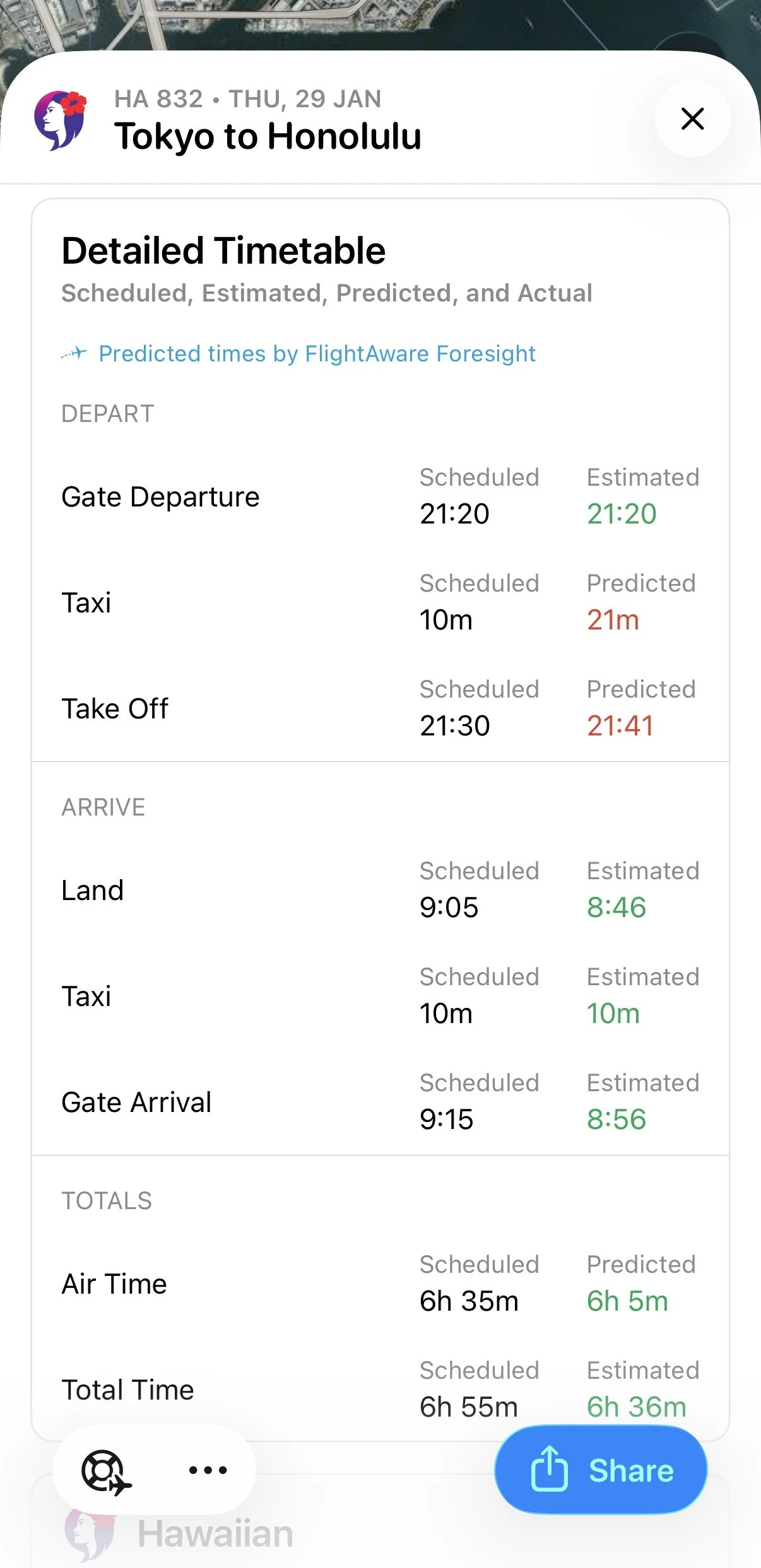
Flighty app showing estimated/predicted times for an upcoming flight
On top of that, it quietly builds a logbook of your flights in the background. This turns into a year end summary that lays out your flying for any given year in one place, for as long as you have recorded your flights in the app.
I still use airline apps for booking, check in, and managing reservations.
But on the actual day of travel, I rely more on Flighty.
Incoming Aircraft Tracking: Where Is My Plane?
The feature that first sold me on Flighty was how it handles the inbound aircraft.
You are not just tracking a flight number in isolation. Flighty shows you the actual aircraft that will operate your flight and what it has been doing for hours, sometimes even days, beforehand.
That means you can:
See the previous leg or legs your aircraft is flying
Watch whether those flights are on time, delayed, or diverted
Spot early warning signs that your own departure might slip
Some airline apps already show basic inbound information, but Flighty goes a step further. It estimates whether the aircraft will realistically have enough time on the ground before your departure and uses that to predict potential delays.
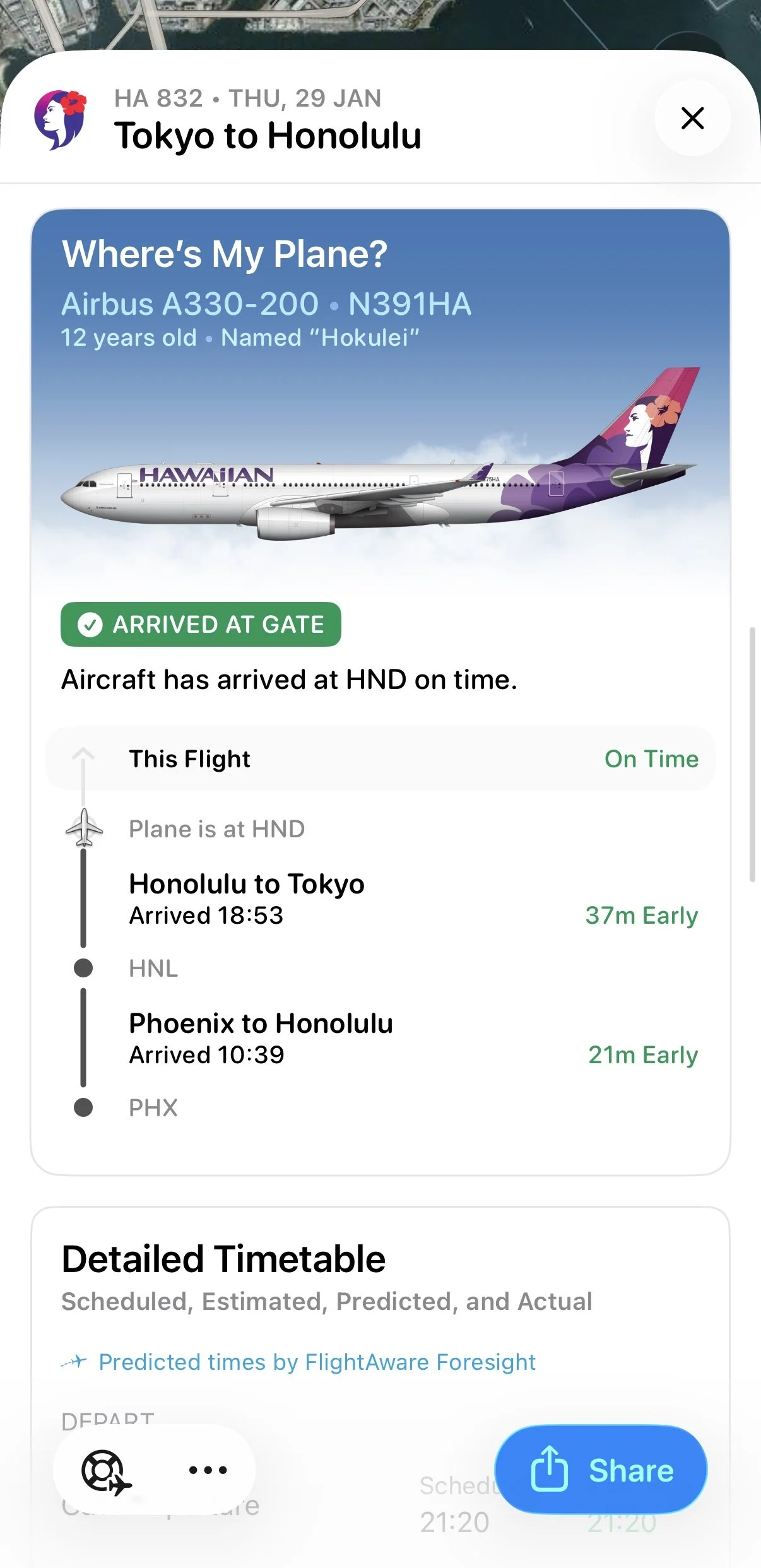
Flighty app shows you where the aircraft you will be flying on, have been flying for the past few flights
For example, say you are flying from Tokyo Haneda (HND) to Honolulu (HNL) and your Hawaiian Airlines aircraft is arriving from Honolulu, where it has just flown in from Phoenix (PHX). With Flighty you can follow that entire chain. If weather, air traffic control restrictions, or congestion cause delays on the PHX to HNL sector, you see that story unfold long before the airline app quietly changes from “on time” to “delayed”.
Instead of a static status line, you get the full upstream context.
Delays And Cancellations: Knowing Before Everyone Else
Airline apps are built around the official schedule. Flighty is built around what is actually happening.
In practice, that often looks like:
Delay alerts that arrive before your airline sends a push notification
Cancellation alerts that appear while the airline app still claims everything is on time
Constantly updated departure and arrival estimates as operational changes filter through
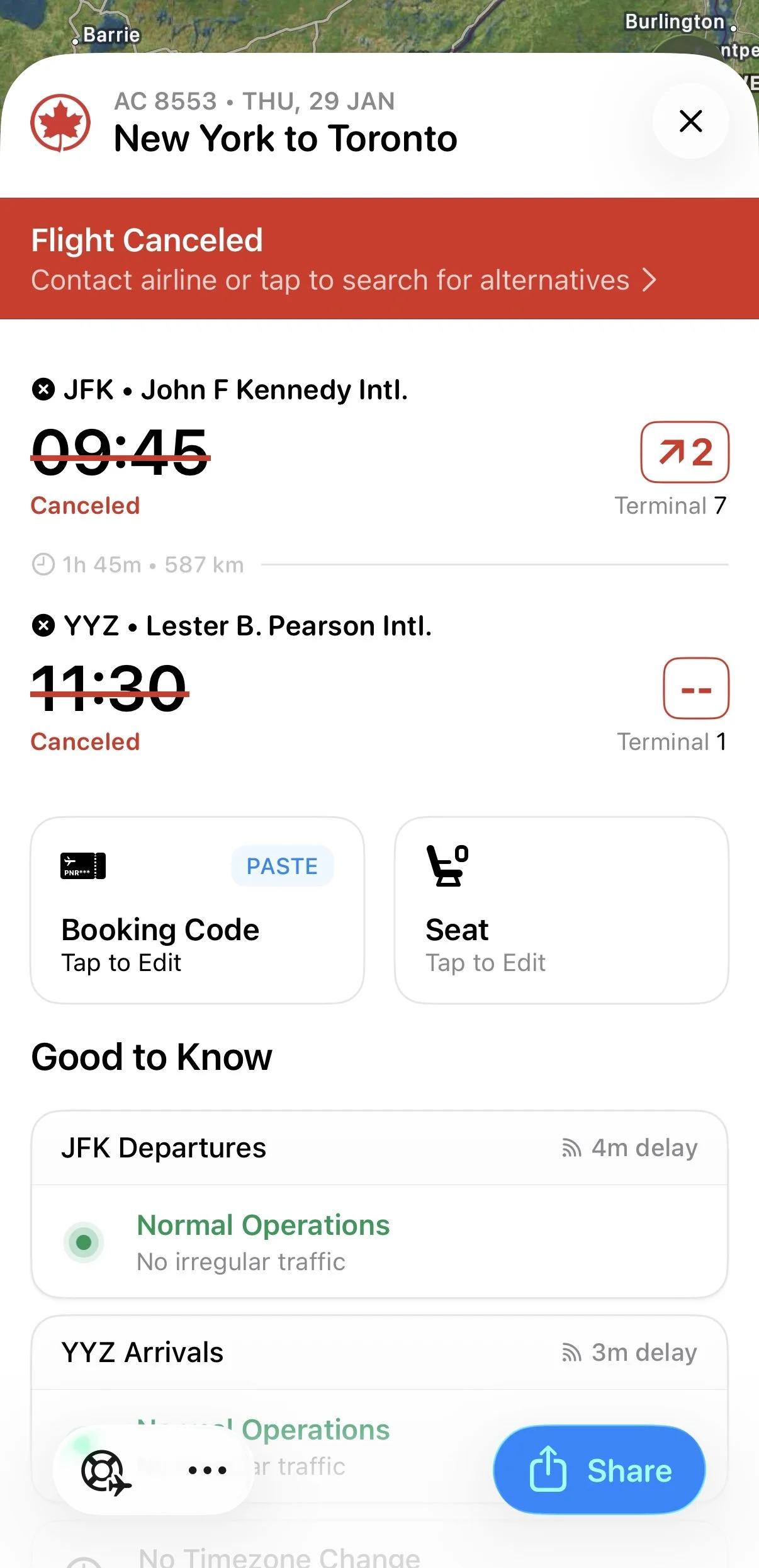
How canceled flight looks like on Flighty app, with the option to view alternative flights
There have been trips where Flighty has warned me about a cancellation while the airline app and website were both still showing the original schedule. That head start is incredibly valuable when you need to rebook a connection, protect a long haul segment, or simply prepare for a long stay in the lounge. When a flight is cancelled, Flighty can also show alternative flights on the same route so you can quickly see what else is operating that day.
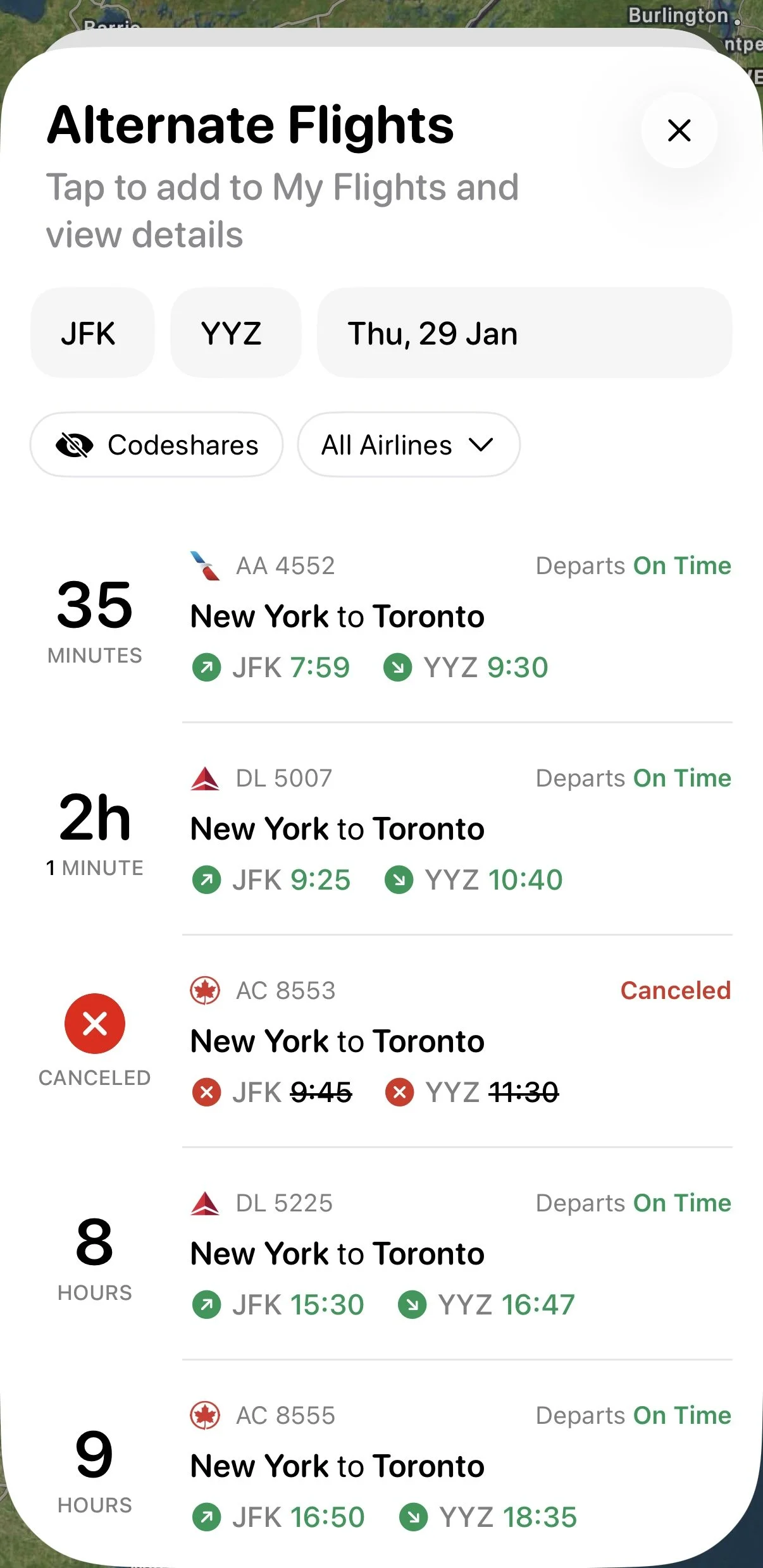
Alternate flights for a given origin, destination, travel date
One area where I think there is room for improvement is how those alternatives are presented. At the moment, alternate flights are limited to non stop options on the exact same sector. So if your New York John F. Kennedy (JFK) to Toronto (YYZ) flight is cancelled, Flighty will show other JFK to YYZ flights, but not options from other New York airports such as Newark (EWR) or LaGuardia (LGA), and not connecting options. It is still very useful as a quick snapshot of what is left on your route, but there is potential to go even further.
Gate Information And Gate Changes
Gate information might sound basic, but it is an area where Flighty has become more useful than both airports and airline apps.
Some airports refuse to show your departure gate until very late, even when the aircraft is already parked. As a side note, this is often done to keep passengers in the central terminal and duty free area to encourage spending rather than letting everyone drift toward the gate too early. Others love last minute gate changes that send half the passengers jogging across the terminal.
Flighty helps by:
Surfacing gate information as soon as it becomes available
Sending alerts for gate changes instead of relying on you to refresh a screen
Keeping your next gate and boarding time front and center on the main view
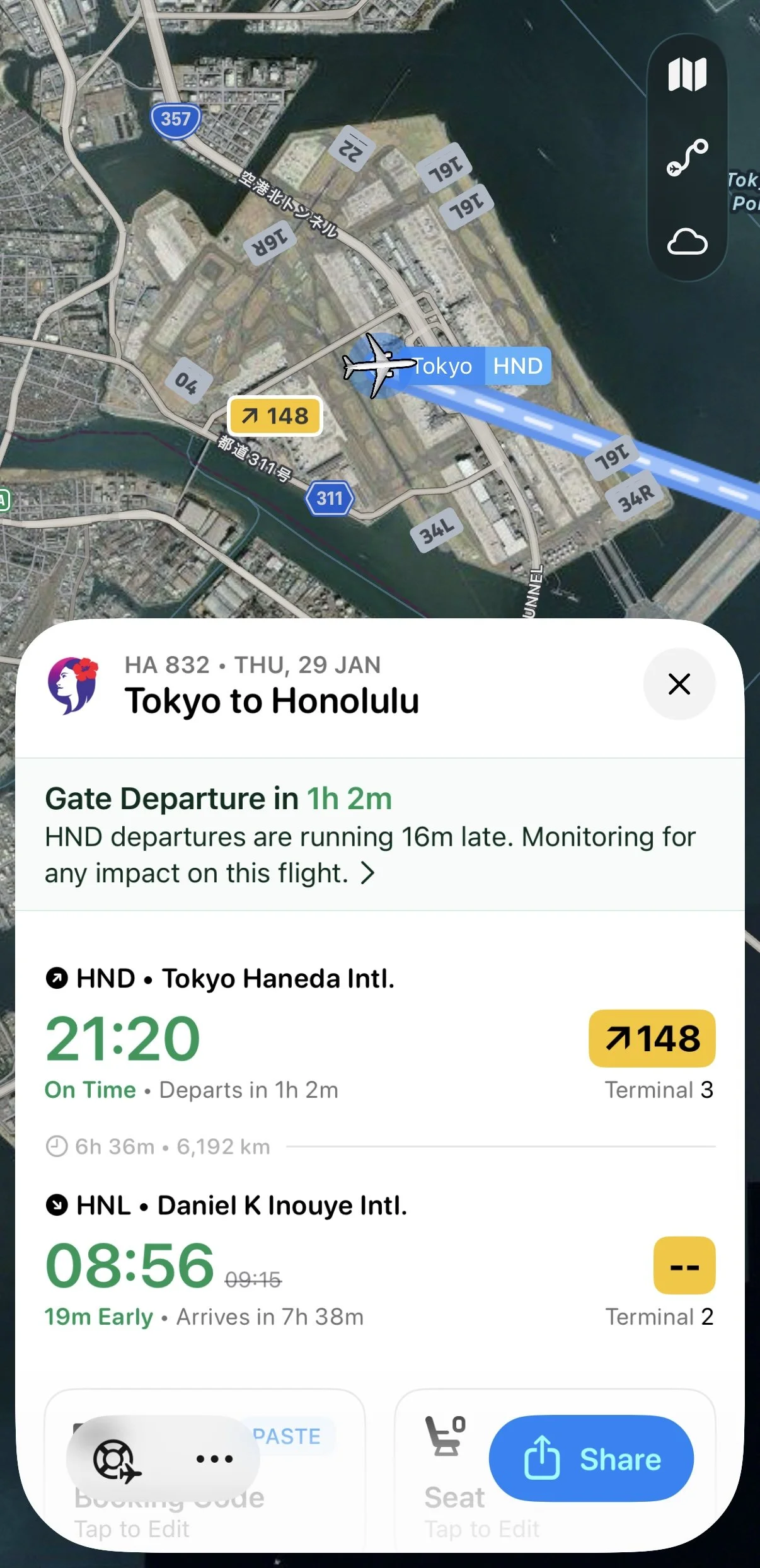
Flighty app screen showing an upcoming flight with terminal and gate information
On routes with tight connections or in larger hubs, those extra minutes matter. More than once I have seen a gate change in Flighty before the terminal screens updated, which makes a big difference when you are trying to decide whether to grab a coffee or head straight to the other side of the airport.
For someone like me with airline lounge access, it also means I can relax in the lounge closest to my departure gate instead of hovering nervously near the main screens.
Aircraft Details And Swaps
If you are into aviation, the aircraft itself matters.
Flighty shows:
Aircraft type
Registration (tail number)
In some cases the aircraft name or special livery
It also makes aircraft changes very obvious. If your flight was originally scheduled as an Airbus A350 and suddenly becomes a Boeing 777, or your A380 turns into a smaller twinjet, Flighty surfaces that clearly.
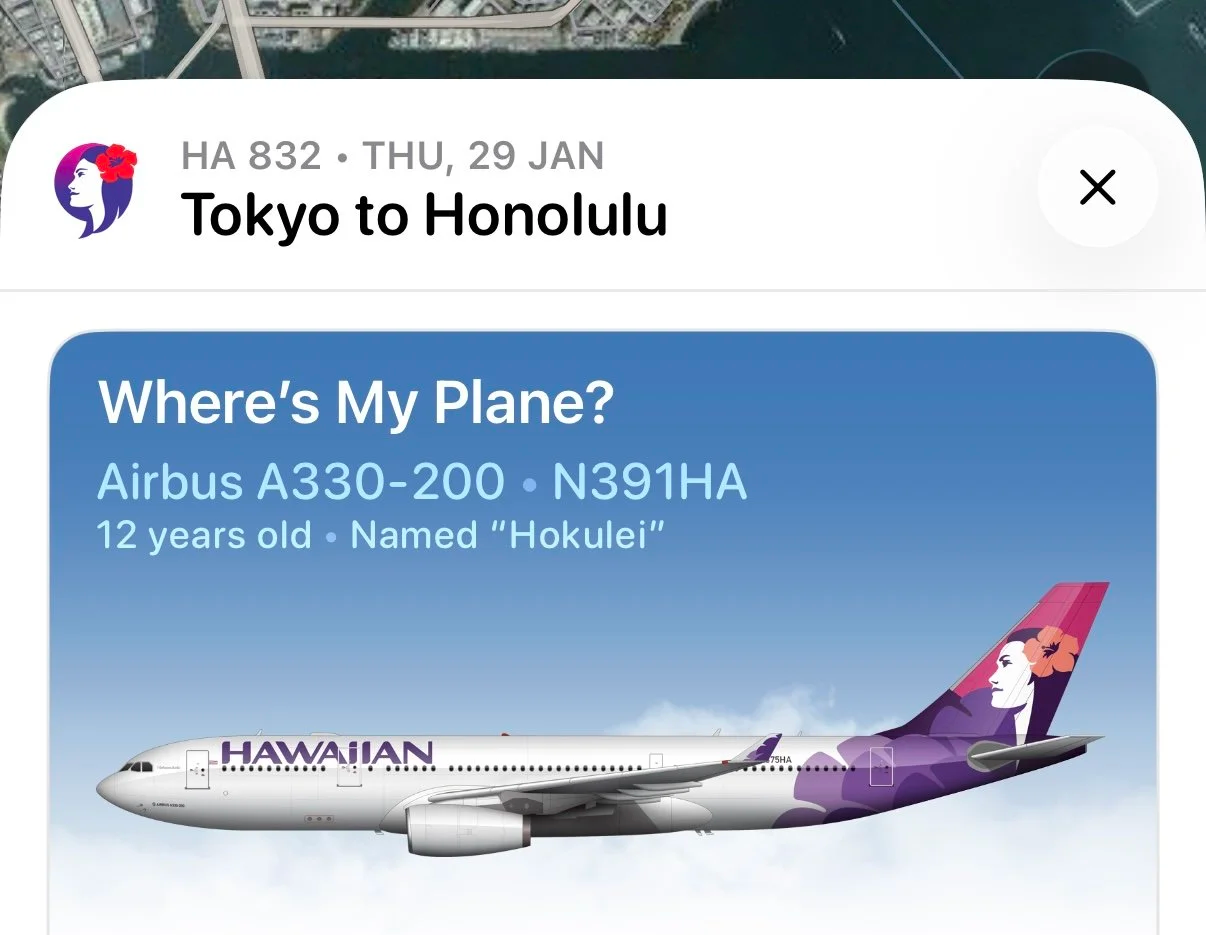
Flighty app showing the aircraft detail for the upcoming flight
That is useful for more than just curiosity. Seat layouts, noise levels, onboard Wi Fi, and even service patterns can change with an aircraft swap. I would much rather know early and adjust my expectations than discover it only when the aircraft appears at the gate.
Route Performance, Airport Delays, And Connection Assessment
One of the most underrated features in Flighty is how it adds historical context to your flights.
Before you even travel, you can see:
How often your specific route arrives on time
Typical delay patterns for your flight number
Delay trends at your departure airport
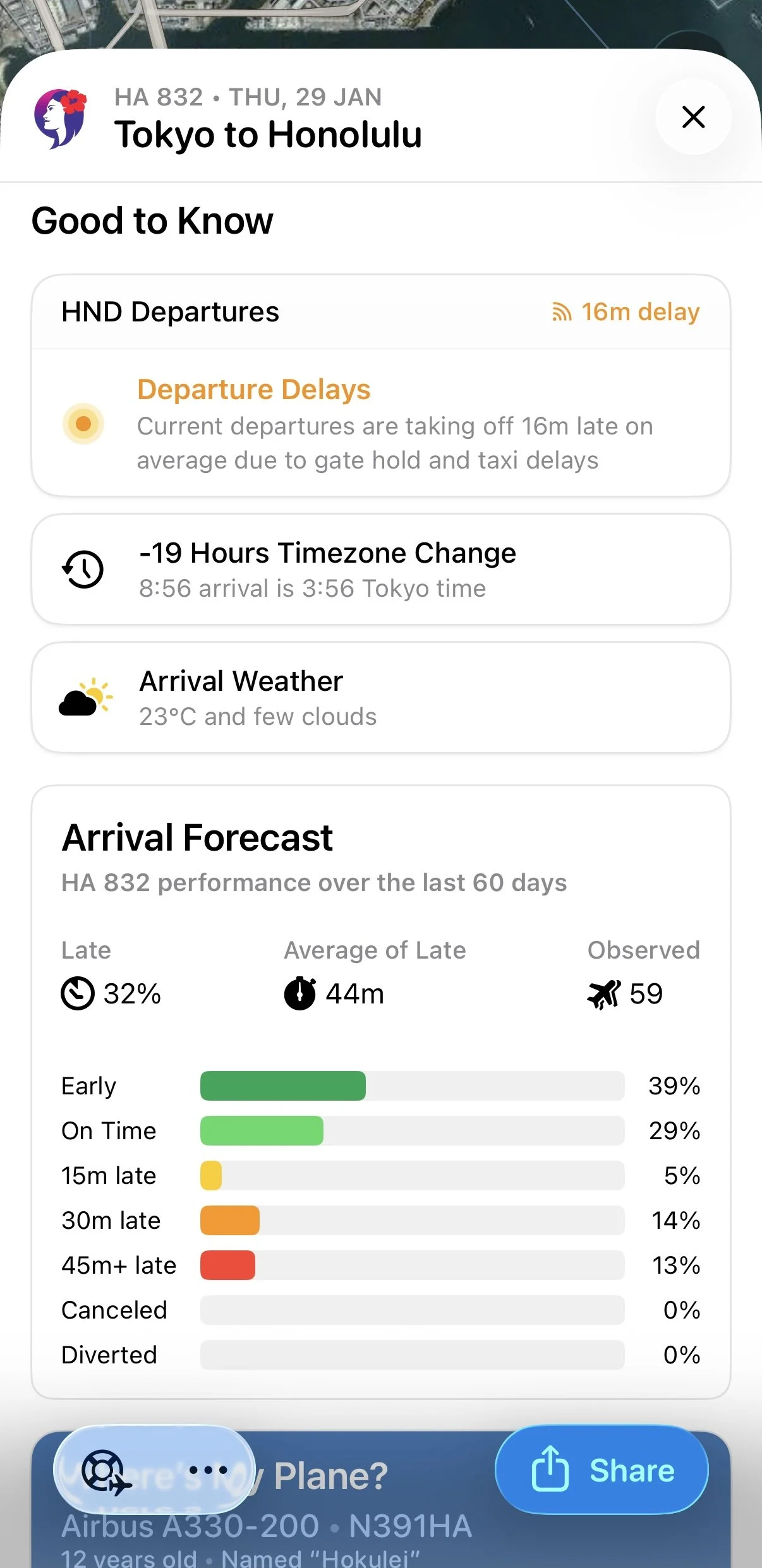
Flighty app showing the arrival forecast for an upcoming flight
On top of that, Flighty also offers a simple connection assessment, showing whether your connection is considered normal or tight for that specific airport and routing, and whether you are likely to change terminals along the way. It is a small detail, but very helpful when you are trying to judge whether a connection window is realistic in real life, not just on paper.
None of this guarantees anything on a particular day, but it gives you a much better sense of risk.
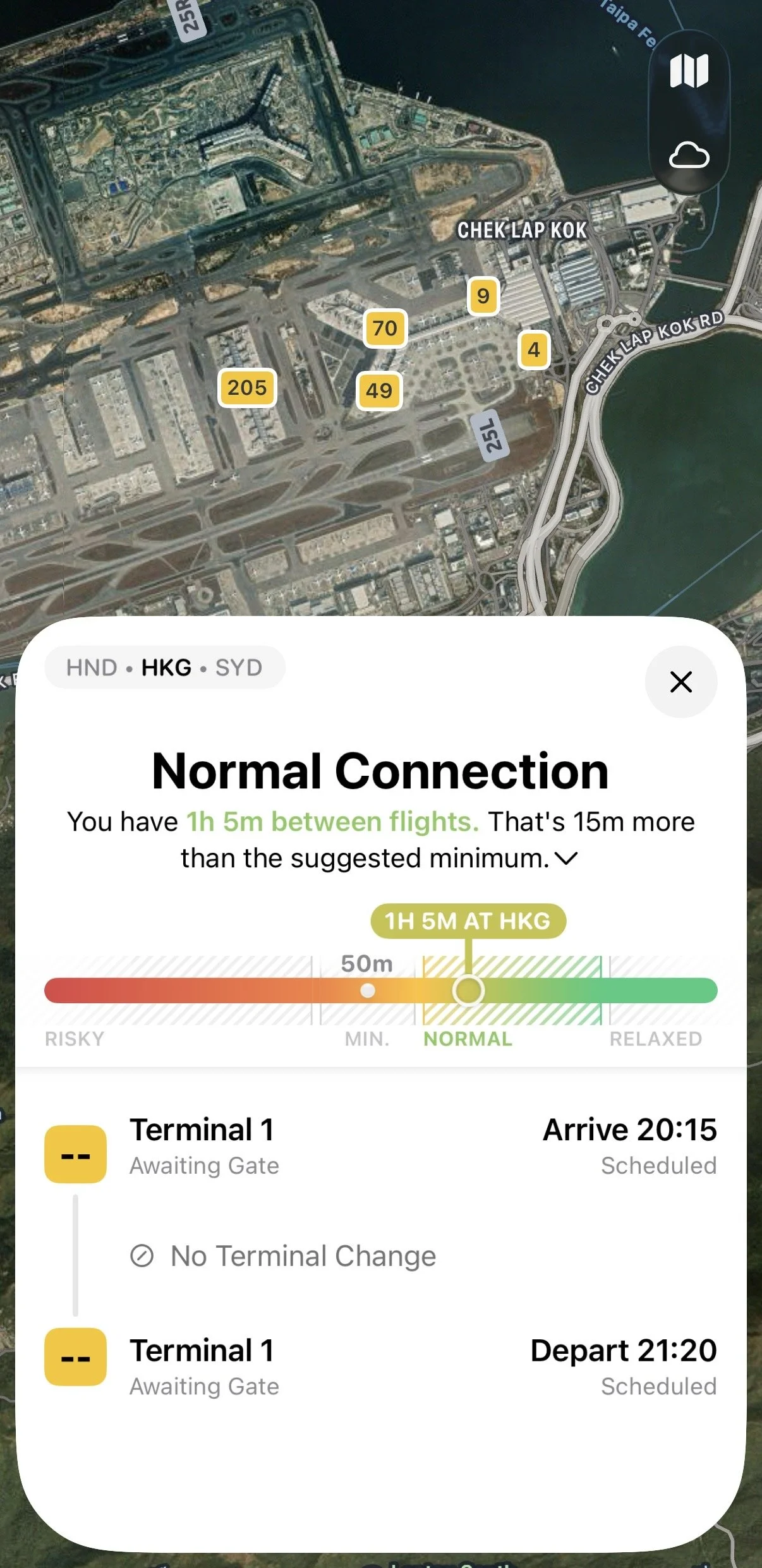
Connection assessment on the Flighty app for a given airport and terminal
If you are looking at a 45 minute connection, you can check whether your feeder flight usually arrives early, roughly on time, or regularly turns up late, and whether Flighty considers that connection normal or tight, possibly with a terminal change involved. That helps you decide whether you are comfortable with the itinerary or should build in more margin.
It also takes some of the emotion out of delays. Instead of feeling like you are uniquely unlucky, you see how your flight fits into broader patterns.
A Logbook And Memorandum Of Your Flights
Beyond travel days, Flighty works as a clean logbook of everywhere you have flown.
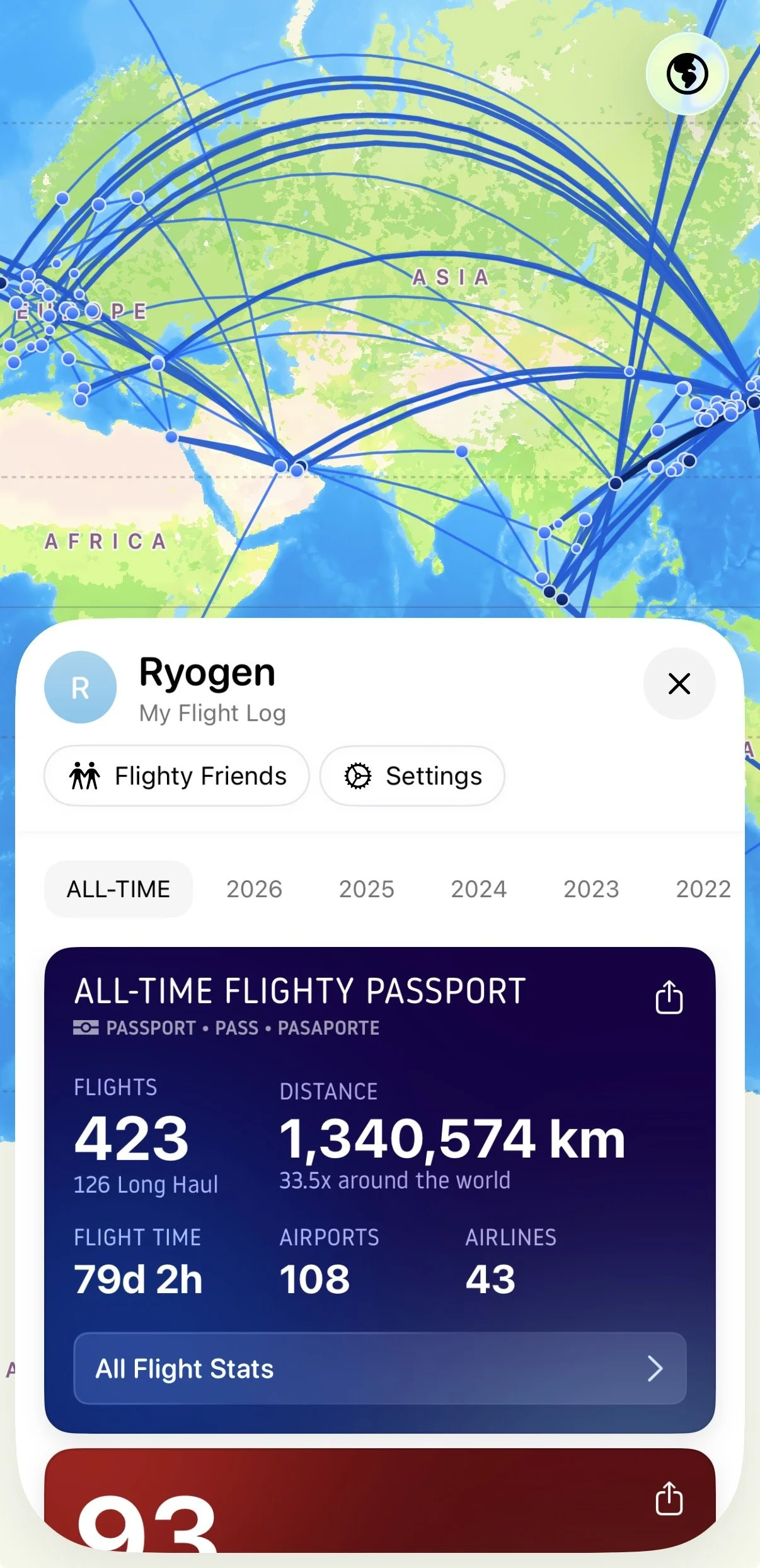
My all-time Flighty passport as of January 2026
Over time it builds up:
A list of all your flights in one place
Route maps that show how your travel connects across regions
Stats like total distance flown and hours spent in the air
Aircraft and airlines you have flown on
A lot of this is purely for memory and enjoyment, but it is genuinely useful too. It is nice to be able to check which airline you used to get to Cape Town (CPT), or look back at the past flights you have taken from Tokyo Haneda (HND) to Hong Kong (HKG).
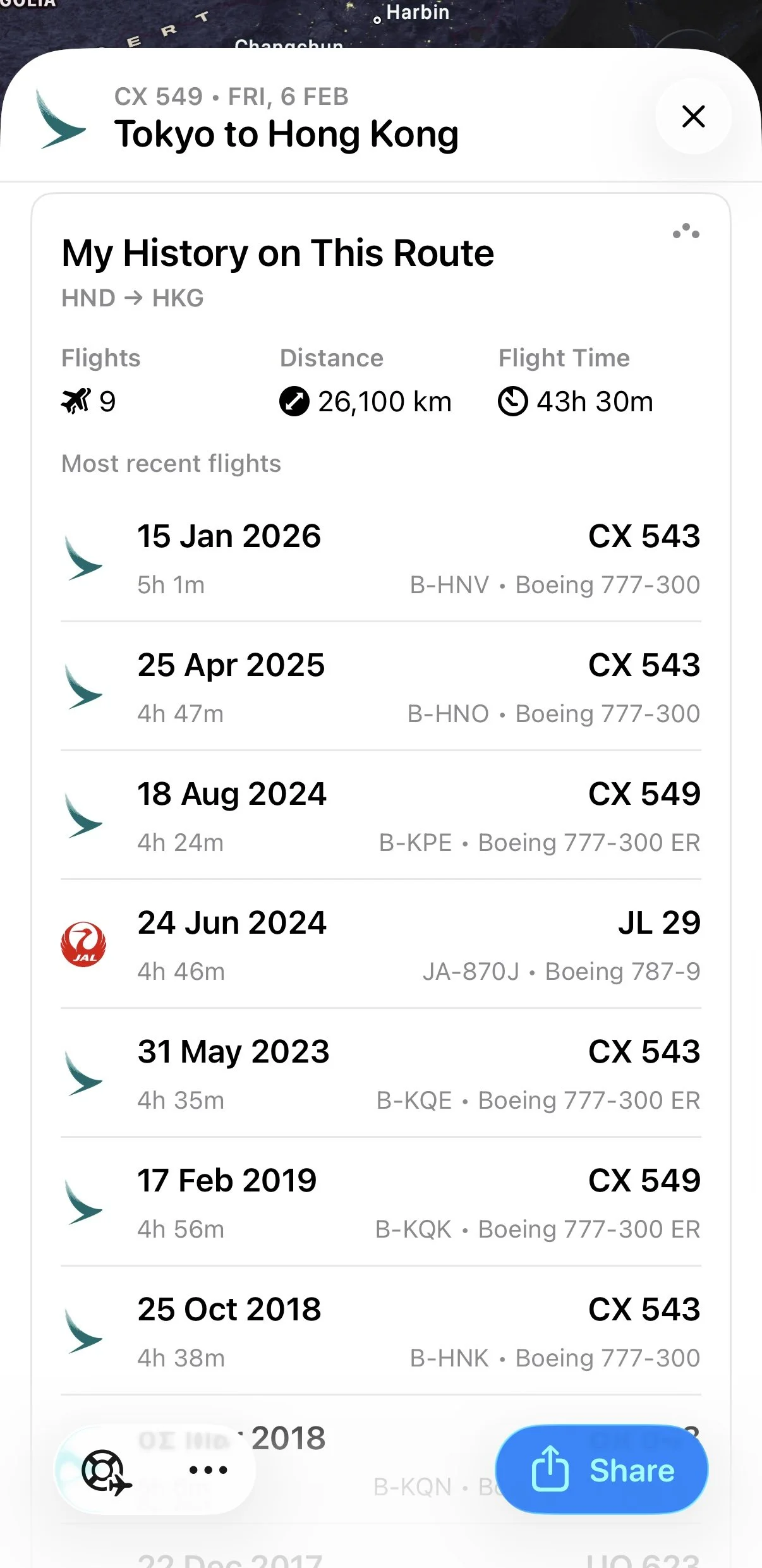
My past flying from Tokyo Haneda (HND) to Hong Kong (HKG)
On a personal level, it becomes a kind of memorandum of your travel life. Looking back over a year of flights, you start to see patterns and stories that would otherwise be lost in old email confirmations and boarding pass screenshots.
The year end summary then wraps that up into a simple visual overview of your last twelve months of flying, which is oddly satisfying if you like tracking things.
Free vs Pro: What I Actually Use
Flighty has a free tier, and that is the easiest way to see if it fits your style. You get basic tracking and a sense of how the interface works.
Most of what I personally rely on, though, lives in Flighty Pro:
Fast push alerts for delays, cancellations, and gate changes
Detailed inbound aircraft tracking for the “where is my plane” view
Route performance and airport delay stats
Connection assessment that shows whether your connection is normal or tight for that airport
The full flight history log and year by year summaries, not just the previous year
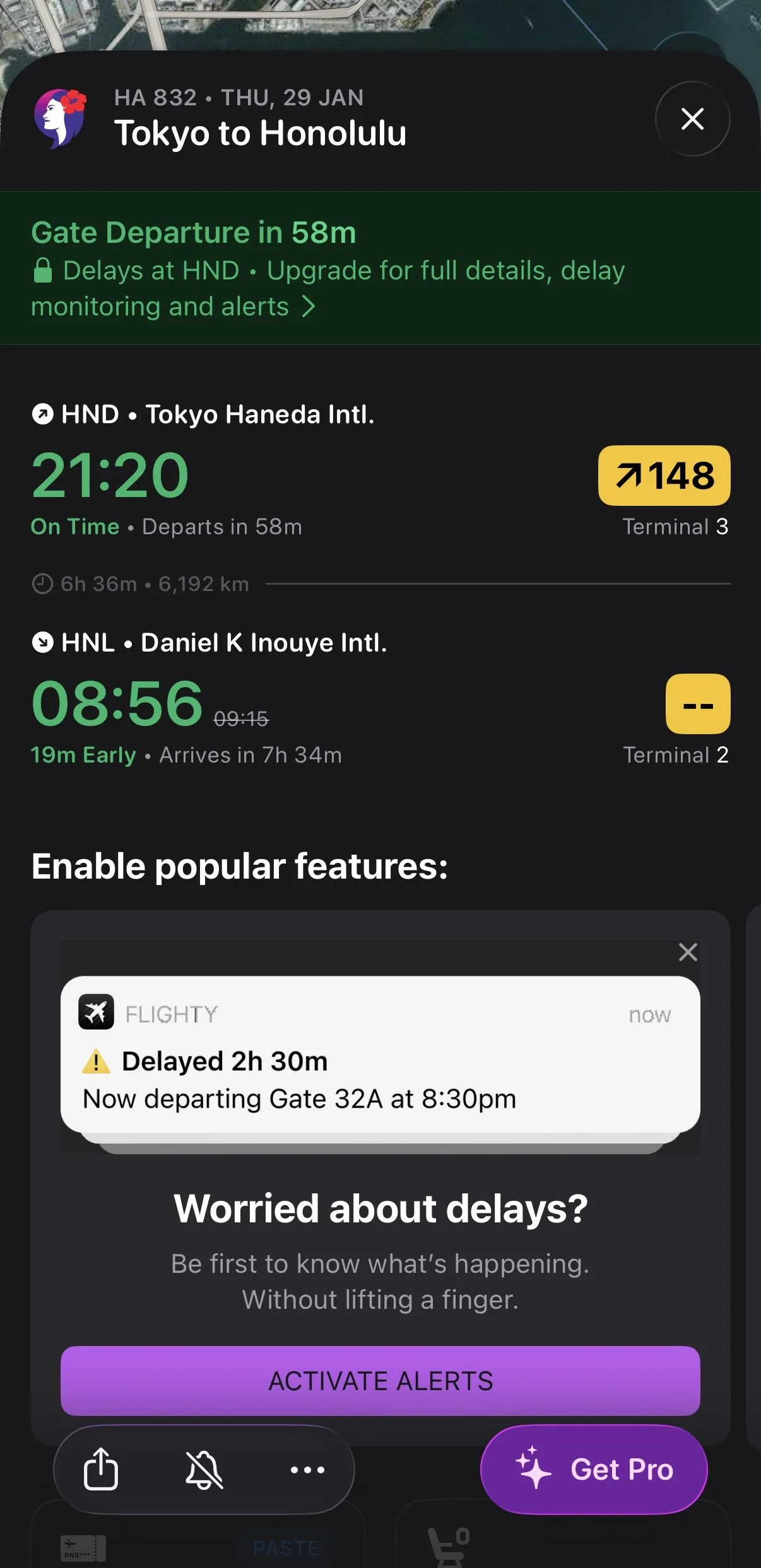
Some features are not available on the free version of Flighty
If you fly once a year, you might be completely fine on the free plan and maybe upgrade temporarily for a big trip. If you fly regularly or string together complex itineraries, Pro quickly starts to feel like part of the cost of traveling well.
Where Flighty Fits In My Travel Setup
My travel stack roughly looks like this:
Airline apps: check in, seat selection, booking changes, mobile boarding passes
Email and calendar: planning, hotel bookings, reminders, general logistics
Flighty: used heavily on the day of travel for real time status, inbound aircraft, gates, delay risk, and post flight history
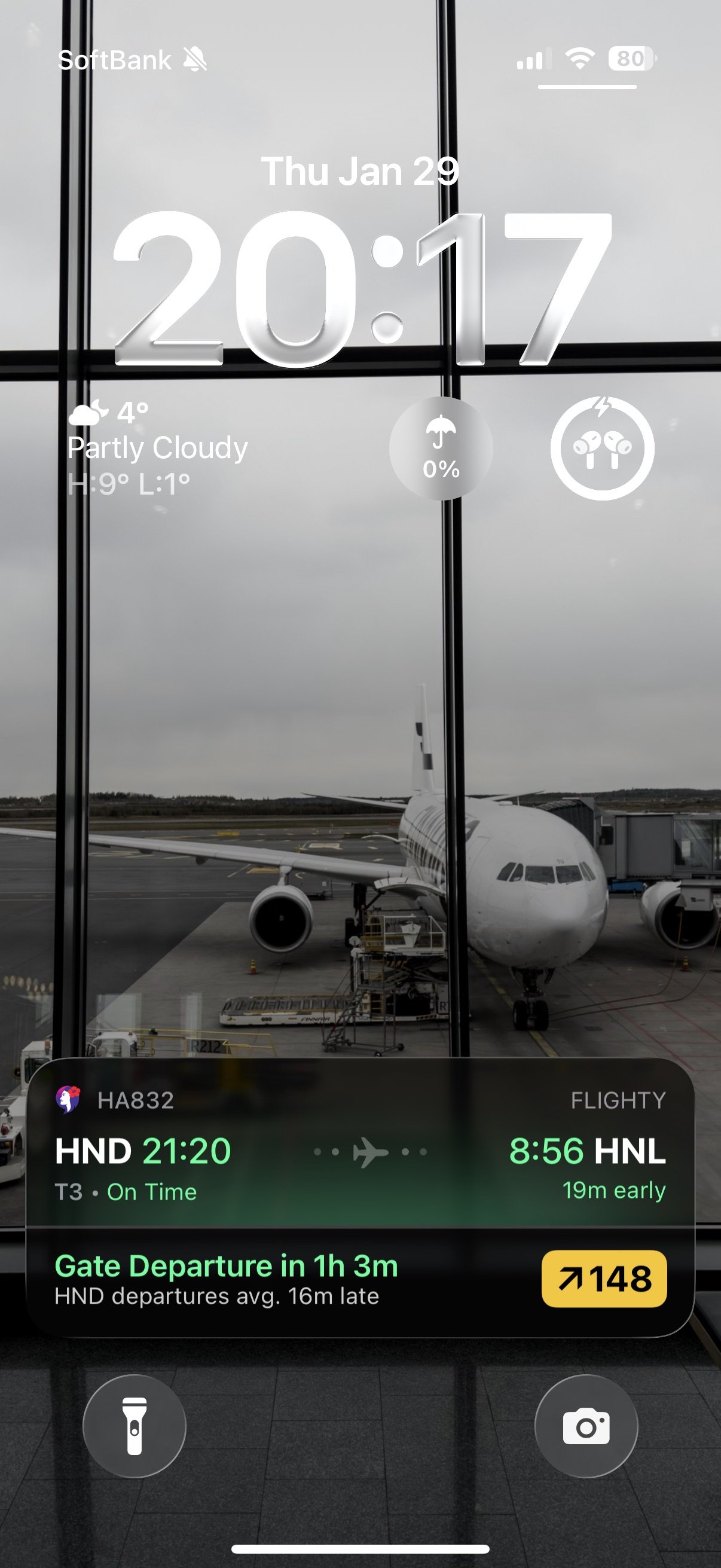
For basic information, I don’t even have to open the Flighty app on the day of travel
On travel days, Flighty is usually the first app I check, or more accurately, the one I hardly need to open because it lives on my iPhone’s Dynamic Island throughout the journey. I glance at the inbound aircraft, confirm gate and boarding time, look at any delay warnings, and then let it run quietly in the background.
When something changes, it sends a notification to my iPhone and Apple Watch, so I can sit back and relax in the lounge and still feel completely up to date on my upcoming flights.
Who I Think Should Try Flighty
I would recommend Flighty to:
Anyone who hates being surprised by last minute delays or gate changes
Frequent travelers who juggle multiple bookings and tight connections
Aviation fans who enjoy aircraft details and route stats
Friends and family who like to follow someone’s flight in real time
If you only fly occasionally on simple point to point routes, you might not need all of this. But if you care about your time, your connections, and having a clearer picture of what is going on behind the scenes, Flighty is one of the very few apps that genuinely earns a permanent place on the home screen.
Out of all the apps that claim to make flying easier, it is the one I actually rely on.
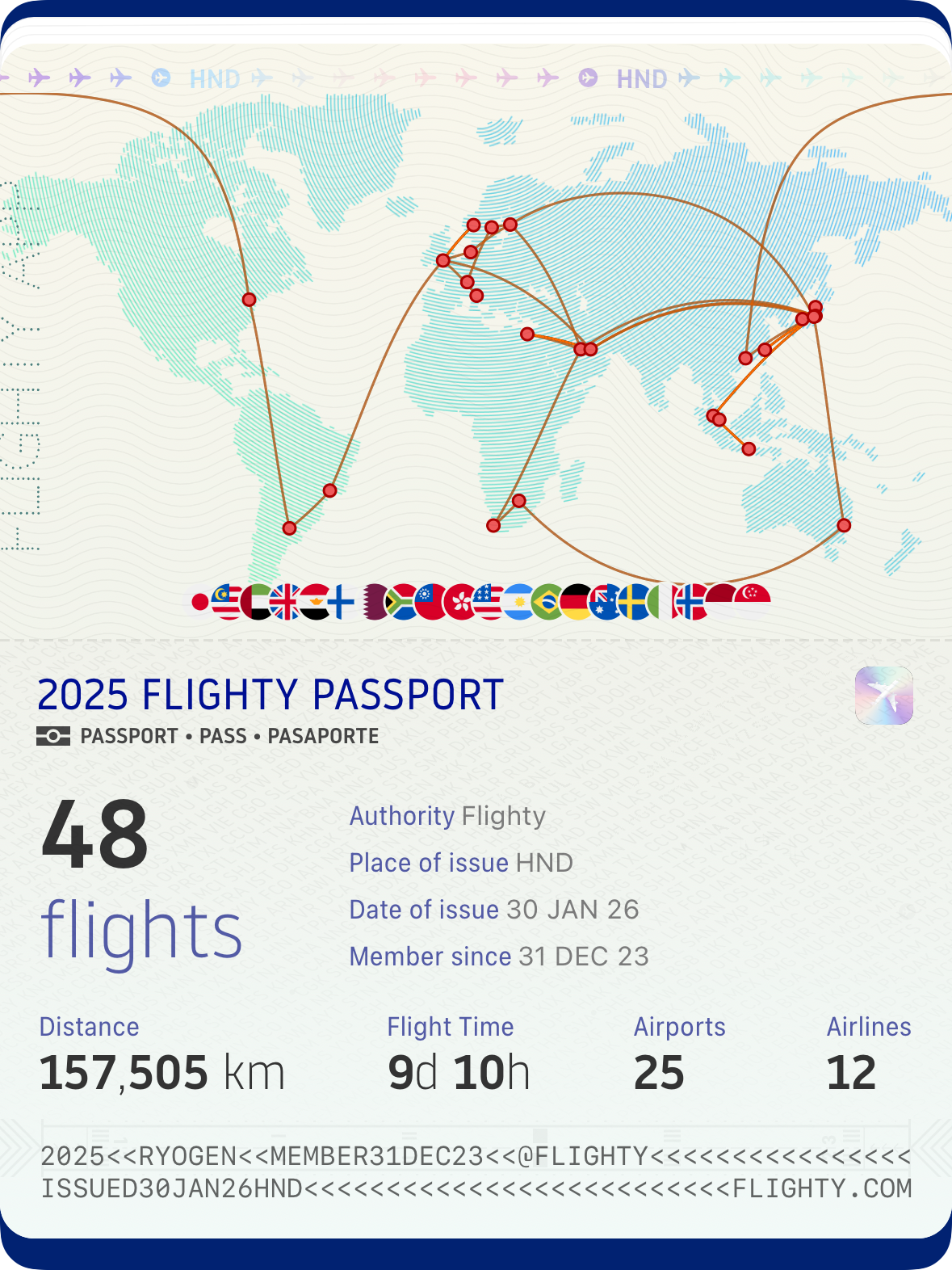
My 2025 Flighty Passport
So for your next flight, give Flighty a try and see if you ever want to fly without it again.
